Social Venn

Luke's Social Venn

Many people are talking about privacy issues on Facebook, and I agree with most of their points. I’m not unhappy with Facebook or any privacy issues, because I’ve always considered everything I do or say or put online to be 100% public immediately. I’ve always used my own name when signing up to any internet service, so whatever I do can alway be tied back to me.

But then again, I don’t have a real job, so have no work colleges or employers to find out about my strange hobbies. Nor do I have children, so I don’t have any worries in that direction.

Anyway, there’s been a lot talk about controlling the privacy of each update, photo or comment someone posts on Facebook. Controlling who can or may or will see that post is impossible, and Facebook switched the default from “Only friends can see this” to “Everyone can see this.” No wonder it is confusing.

There have been various discussions about alternatives to Facebook, including the crowd-funded Diaspora. On TWiT, a pundit talked about controlling who sees what in a hypothetical social website by using ever widening circles of trust. On one extreme there is “everyone” and at the other extreme is “Just my closest friends.” In between would be “other friends”, “work people,” and maybe “stranger I met in a bar, made my friend, but can’t work out how to unfired them.”

While this is a simple idea, I think it is slightly too simple to be useful. What I’d like to see is “Social Venn.”

The idea is that each time you click a “Submit” or “Post” button, a window opens with a colorful Venn Diagram. Who can see the post depends on where you click the diagram.

The above image is what my Social Venn would look like based on the groups I put my contacts into on Facebook. To be clear, those not in the Friends segment aren’t people who I don’t consider friends, but if I wanted to send out a message about something personal, I’m not sure if the listeners to my podcast are the right target.

So, you see this diagram, and click the parts of the graph who you want to see what post. Not just one part, but two or three or four parts.

Alternatively, you can “Select All” and then (maybe) right click to pick which sections of your Social Venn will not, nor ever, see what you post. A post might go to all of your closest friends, but even if one of your work colleges is your closest friend, if you say “Not for work people” they’ll never see that post, even if it goes to all your other friends and they are discussing it among themselves like mad.

That’s my idea.

Making and displaying the Social Venn would be a fun and simple coding project, though not one I’m particularly interested in doing myself. The idea is actually one Facebook could implement, as it uses tagging and not folders to organize friends. If Facebook or Diaspora want to pay me to consult on their platforms, I’d be happy to take your money.

Or maybe this could be tied into a third party program or service, and aggregate your posts out to Twitter, Facebook, FriendFeed, etc. I’d love to have this kind of control over my social internetting. If you are working on something like this, I’d be happy to take your money too.
Posted in Life, Meta, Random, Writing | Leave a comment

Song for “April” – Work It Out Yourself

In my list of 50 goals and plans for 2010 I wrote “6.1 Write an album’s-worth of new songs and record them by the end of the year” which I’m interpreting as one song per month.

Here is the song from “April” — meaning I didn’t write a song in April, and I’m now catching up. I wrote this song last night, and recorded it just this afternoon. I’ve not played the guitar much, due to being away all of April, and my fingers now hurt quite a bit.

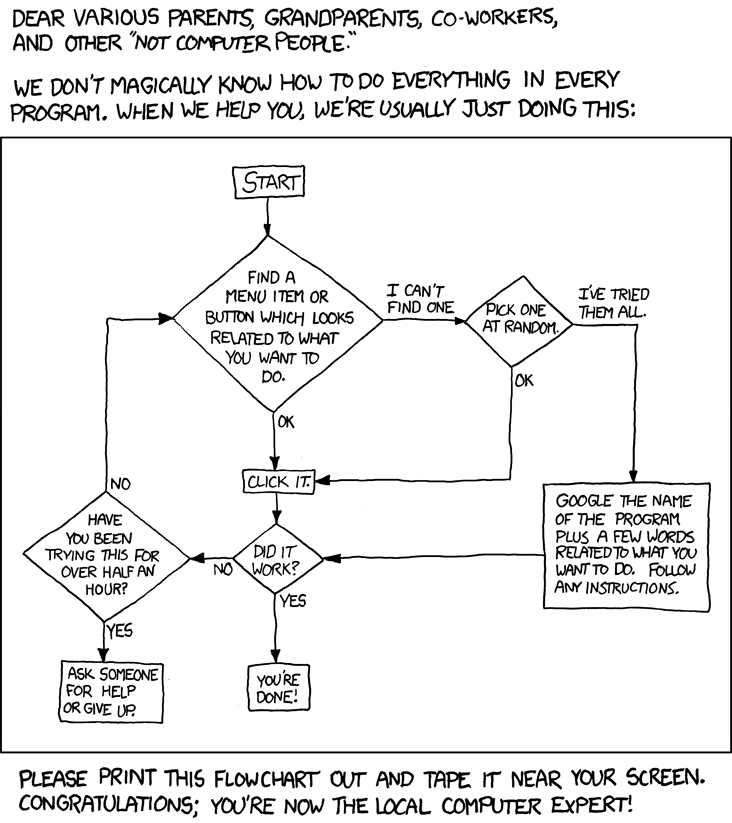
The song is called Work It Out Yourself, and was inspired by someone on the internet asking how me to do something quite simple. It made me think of the XKCD “Tech Support Cheat Sheet” comic.

So I wrote a song, not about computers specifically, but about the idea of doing the work yourself, so next time you have the same problem you’ll just know what to do.

The song is less than a day old, so I’m sure it will change and improve over time. Maybe, with a bit more practice, I’ll even be able to sing it properly.

XKCD 627: 'Hey Megan, it's your father. How do I print out a flowchart?'

Posted in Life, Music, Videos | Leave a comment

A month of music: listening to my entire iTunes music library in order – part 2

A year ago I made a post:

“Why not listen to my entire iTunes music library, sorted by track name, and see how long it takes?”

I actually listened to all the music in my library again last November and December, not sorted in any way, I just made sure I listened to everything within a month.

Over the past few weeks I did something similar, and finished this morning. I listened to my iTunes music library, sorted by track length. I had a lot fun, certainly more than the previous times I’ve listened, as I’ve deleted all the duplicates, and got rid of lots of music I actually didn’t like.

At the end of my post about this last year I said: “I think I’ll now do it again, but sort by track length. I’ll start with the longest tracks, and end up with the shortest.” I forgot I wrote that though, and started with the shortest.

Some notes:
– The first track was a 5 second piece of silence which I use in my show.
– The last track ran 12:44, Slow Movement from the Romeo and Juliet soundtrack.
– Lots of short tracks are used on albums as filler bits between other tracks.
– Indie bands often have a minute long piece of music on an album.
– Sound track music can be any length. The final ten tracks were all sound track pieces or classical music.
– Techno, drum and bass, and other electronic music hardly showed up until I got to 5 minute-long tracks.
– Final tracks of albums are often artificially long, with a few minutes of silence before a “hidden” track.
– This method of sorting created a far more random mix that sorting by track name.

I don’t think I have much else to say about it. It’s just a fun project, and I recommend you do something similar. Album by album is good, but this way different tracks stand out.

Posted in Life, Music, Random | Leave a comment

Two years of SFBRP downloads

SFBRP download stats to April 2010

This graph shows the total number SFBRP episodes per month for the last two years. I noticed an upswing in the listener numbers recently, so I wanted to see what it looked like over time. Pretty good, I think! In April, random people across the world downloaded just under 25,000 individual episodes. That’s more downloads than I had in the entire of 2008!

I’ve asked for listener feedback, regarding where the new listeners were coming from, how they found out about the podcast, and why they started listening. The range of answers is quite interesting:
– Interested in science fiction, did an iTunes search, found the podcast.
– Did an iTunes search, found the podcast.
– Just searched using iTunes.
– An iTunes search.
– iTunes.

So, it’s really that simple. It’s not a scientific survey, so maybe people who hear about podcasts via word of mouth aren’t the kind of people who like sending in emails.

I’ve yet to bash the numbers for individual episode downloads, because the stats I have are month on month. This means that if a podcast is released late in the month, the initial week of download figures are split over two months. In April 2010, the most downloaded podcast was SFBRP #089 – Dani and Eytan Kollin – The Unincorporated Man, with 2,421 downloads.

Posted in Life, Podcasts | 1 Comment

I’ve been decorating

Over the past five days I’ve done a lot of work on my apartment. I painted the ceiling of the living room and juggling space, something I never got round to doing, despite living here for 3 years. I bought and laid carpets too. I built a table/shelf for the back of the couch, and generally made the place look presentable. Here are some extreme before and after photos…

February 2007, before I moved in (that is the property agent with Pola):

The same room today:

The juggling space is the big empty area. All my practice gear is kept in the cases on the right hand side. Behind the camera is another 4 meters of space, which I’m currently using to build the stage of the new show I’m working on.

Also, here’s some quick photography tips for taking photos of rooms:
– Use a rectilinear wide angle lens. Photo one is a point and shoot, probably at 30mm. The second photo is using my 10mm, and makes the room look HUGE. The rectilinear lens also keeps all the edges and lines straight, unlike a fisheye lens.
– Get low to the ground. The lower you are, the more space there seems to be above camera. Of course, the ceiling in this room is about 4.2 meters, so it’s going to feel lofty anyway.
– Turn on all the lights. This room has some big windows, but they face into a yard surrounded by 6 story buildings, so the light isn’t great. The more light, the better the photo.
– In post processing, boost the brightness even more.
– Make sure the white balance is set so the white walls aren’t pure white. They should be slightly orange, to give warmth. Certainly not the blue of the top photo, which is lit by the camera flash.

Here’s the room again, zoomed in a bit.

Posted in Juggling, Life, Photography, Tutorial | 2 Comments